Examples
This page walks through the end-to-end examples of kLLM 0.1.0.dev0: keyed serving, client-keyed serving through the local proxy, and the MiniMax H3 pipeline. Each example lists the machine on which every command runs. The Quickstart covers installation of the extras and the first key.
Keyed serving
In keyed serving, one trusted machine holds the key, unlocks it and runs the engine. In production that machine is a confidential VM that receives the key from the deployer’s key broker (Confidential VM deployment). The commands below use a passphrase-protected key file instead, which is the development mode.
Warning
Outside a confidential VM, kllm serve --key decrypts the tokenizer into the host’s
/dev/shm, unlocks the weights into a cache directory on the host and offers no
protection from the host.
On the model owner’s machine:
$ kllm keygen
$ kllm seal ~/models/Qwen3-8B -o Qwen3-8B-sealed --transform orth
On the serving host, after copying the sealed directory and the key file:
$ kllm serve Qwen3-8B-sealed --key
$ kllm serve Qwen3-8B-sealed --key --engine vllm
$ kllm serve Qwen3-8B-sealed --key --tp 2 -- --context-length 32768
The transform is read from the sealed model, so kllm serve takes the same options for
orth and perm. kllm seal locks the weights by default; on the first start,
kllm serve --key unlocks them into ~/.cache/kllm/unlocked (Locked weights). --tp sets the tensor-parallel size; without it, kllm serve
uses the recipe’s value or all detected GPUs. For an unattended start, export
KLLM_PASSPHRASE before the command.
Other launchers, such as NVIDIA Dynamo or a Kubernetes deployment, start the engine
themselves. For them, kllm unlock decrypts the tokenizer into memory and prints only its
path on standard output; for a locked model it also unlocks the weights and reports their
directory on standard error:
$ TOK=$(kllm unlock Qwen3-8B-sealed 2>unlock.log)
$ MODEL=$(sed -n 's/^ *weights unlocked: //p' unlock.log)
Pass $MODEL to the engine as the model and $TOK as --tokenizer-path (SGLang) or
--tokenizer (vLLM).
NVIDIA Dynamo and Kubernetes and llm-d describe these setups; they have not yet
been run end to end.
Client-keyed serving
Client-keyed mode is for a user who rents GPUs for their own model and has no confidential VM. The key and the permuted tokenizer never leave the user’s machine. The cloud serves the sealed weights without a key and exchanges token ids only; a local proxy on the user’s machine tokenizes and detokenizes.
On the user’s machine, seal with --client:
$ kllm seal ~/models/Qwen3-8B -o Qwen3-8B-sealed --transform perm --client
Next to Qwen3-8B-sealed, the command writes Qwen3-8B-sealed-cloud, which holds the
weights, unlocked, and configuration files only, without key material or tokenizer. The
user’s copy keeps its weights locked. kllm cloud writes the same directory later from a
sealed model (kllm cloud). --cloud DIR
chooses another location. Upload only the -cloud directory.
On the cloud host, which needs the seal extra and an engine extra but no key:
$ kllm serve Qwen3-8B-sealed-cloud --client
$ kllm serve Qwen3-8B-sealed-cloud --client --engine vllm
--client starts the engine with --skip-tokenizer-init, so it takes and returns token
ids. It cannot be combined with --key, --key-source cdh or --production. If the
directory contains files that belong on the user’s side, kllm serve prints a warning.
Warning
kllm serve --client binds 0.0.0.0 by default and has no authentication, and
kllm client connects over plain HTTP. Bind --host 127.0.0.1 and reach the server
through an SSH tunnel, or place it behind your own authenticating gateway.
On the user’s machine, which needs the client extra, start the proxy against the cloud
server. --engine must match the engine the cloud runs:
$ kllm client proxy Qwen3-8B-sealed --url http://CLOUD:8000
$ kllm client proxy Qwen3-8B-sealed --url http://CLOUD:8000 --engine vllm
The proxy listens on 127.0.0.1:8001 by default (--host, --port) and reports the
model under the directory name unless --name is given. It serves
/v1/chat/completions and /v1/completions, with streaming, stop strings and
chat_template_kwargs, and SGLang’s /generate:
$ curl -s http://127.0.0.1:8001/v1/chat/completions \
    -H 'Content-Type: application/json' \
    -d '{"messages": [{"role": "user", "content": "hi"}]}'
Note
In 0.1.0.dev0 the proxy handles non-streaming requests one at a time. Use streaming requests when several clients share one proxy.
What this mode protects: engine logs, access logs, gateways, packet captures and stored
payloads on the cloud hold token ids under the key’s vocabulary permutation, not text.
With SGLang logging every request in full, the --key server’s log held 25 of the 27
three-word phrases of a test prompt and its reply; the --client server’s log held none.
What it does not protect: token ids are a substitution cipher open to frequency analysis,
and a cloud that holds the public model recovers the vocabulary permutation and the
transforms from the sealed weights, whether the model is unmodified or a fine-tune. See
Client-keyed mode and Claims.
Measured on one NVIDIA A40 with Qwen3-1.7B under perm, 1024 input and 128 output
tokens, client-keyed serving through the proxy matched keyed serving in output throughput at
concurrency 16 under SGLang (1042 against 1039 tok/s) and was 7% lower under vLLM (963
against 1036 tok/s). The full table is in Measured results;
benchmarks/client.sh reproduces the measurement.
The same mode serves the Z-Image text-to-image pipeline, with kllm client generate on
the user’s side and results encrypted to a one-off key per request; see
Generating images in client-keyed mode.
MiniMax H3
kllm seal recognizes a MiniMax H3 partition from its model_index.json and seals the
text encoder, the diffusion transformer (DiT), the latent interfaces and the tokenizer files
together. perm is the recommended transform for H3. The pipeline is served with SGLang
only.
$ hf download MiniMaxAI/MiniMax-H3 --include "FL2VA/*" --local-dir models/MiniMax-H3
$ kllm seal models/MiniMax-H3/FL2VA -o models/MiniMax-H3/FL2VA-sealed --transform perm
$ kllm serve models/MiniMax-H3/FL2VA-sealed --key --tp 1 --no-recipe -- \
      --dit-layerwise-offload true --layerwise-offload-components text_encoder vae
Sealing FL2VA (135 GB) took about 15 minutes on one A40, measured before weight locking was
added. kllm serve builds a view of
the sealed directory in memory with the decrypted tokenizer files in place and runs
sglang serve with the matching --model-variant. The arguments after -- enable
SGLang’s layer-wise offload, which the measurements on a 48 GB A40 used.
Generate a video with the repository’s client script, which polls the server and writes the
result to --out:
$ python tools/h3_generate.py "A red fox trots through fresh snow." \
      --port 8000 --seed 7 --out sealed.mp4

Same prompt, seed 7, 768p, 4 s, 49 steps on one A40 with layer-wise offload (SGLang
0.5.21). Left: plain H3. Middle: sealed with perm. Right: the sealed files with the
public tokenizer, that is, without the key.
Measured end to end with perm, the sealed pipeline ran as fast as the plain one: 220.4 s
for both at 8 steps and 110.3 s for both at 2 steps, each pair run at the same time on two
GPUs of the same host. After 49 steps the sealed video shows the same scene; perm moves
the final latents no more than switching plain H3 from FlashAttention to PyTorch SDPA.
Important
The H3 decoders run in the clear. Decoded video and audio are in GPU memory without any transform.
kllm serve --key --int8 runs the H3 DiT on INT8 kernels. This is a kernel optimization,
separate from sealing, with measured numerical drift; see Running the H3 diffusion transformer on INT8 kernels. The full
H3 procedure is in Sealing and serving MiniMax H3.
The two-stage demo
kllm demo chains a sealed Qwen3-8B, which expands a short idea into an image prompt, and
a sealed Z-Image, which draws it. Each stage also runs as an attacker who holds the sealed
files and the public base checkpoint but guesses the key.
Warning
kllm demo up does not start in 0.1.0.dev0 and is under repair. The commands below
show the intended sequence only.
$ kllm seal ~/models/Qwen3-8B -o ~/models/Qwen3-8B-sealed
$ kllm seal ~/models/Z-Image -o ~/models/Z-Image-sealed
$ kllm demo up --llm ~/models/Qwen3-8B-sealed --llm-base ~/models/Qwen3-8B \
      --image ~/models/Z-Image-sealed --image-base ~/models/Z-Image --gpus 1,2
$ kllm demo run "a cat astronaut on the moon, watercolor"
$ kllm demo down
kllm demo up takes one to four GPU indices in --gpus and binds its four services to
127.0.0.1 by default, on ports derived from the base port 30100 (--host,
--port). kllm demo run writes the images, the generated prompts in plain text
(prompts.json) and a comparison sheet to demo-out (-o changes it). kllm demo
down stops the services recorded in ~/.kllm/demo/state.json; if the machine has
rebooted since up, delete that file instead.
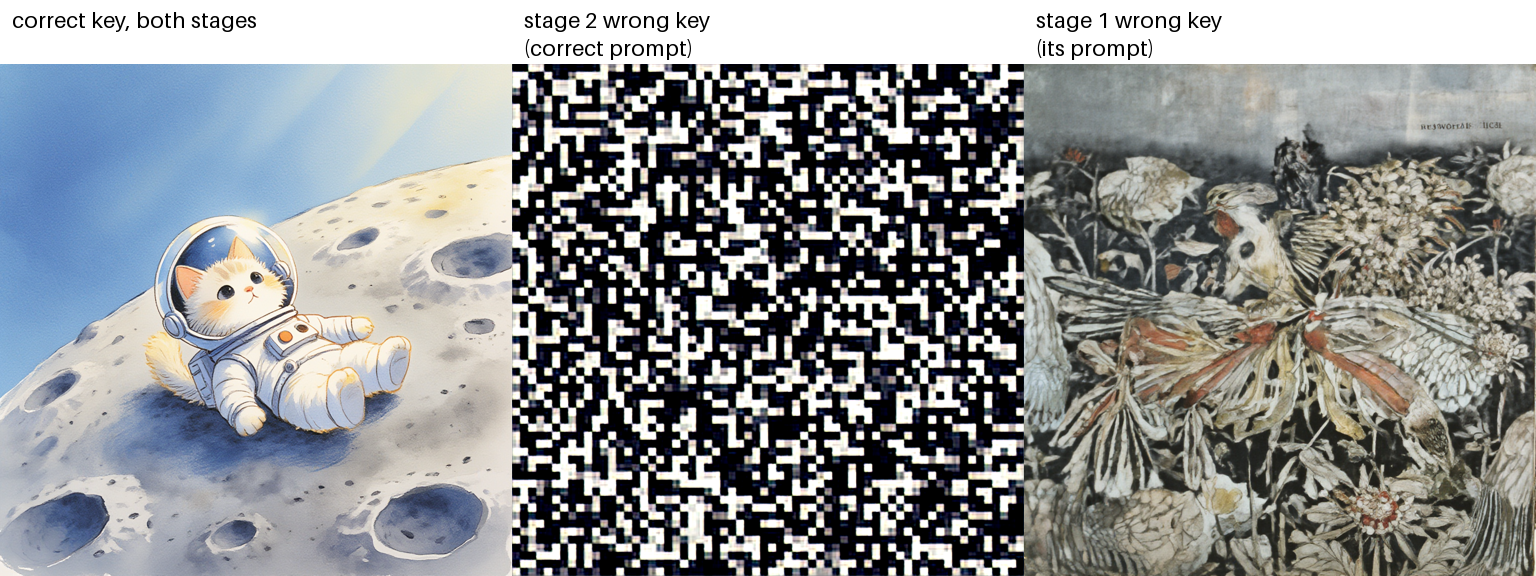
Output of kllm demo run. Left: the correct key at both stages. Middle: the correct
prompt drawn by Z-Image under a wrong key. Right: the prompt written under a wrong
language-model key, drawn by Z-Image under the correct key.
The demo’s attacker holds the public base checkpoints, which are the plain models, so the demo shows the wrong-key behavior; it does not show confidentiality for a model whose weights are already public.